
Agent evaluators
Automatically score the quality of what your agents produce, on every run, so you can measure and track agent quality over time.
What it is
Evaluators measure how good an agent’s output is. Where a Guardrail decides in the moment whether output is allowed through, an evaluator runs afterwards and scores the result, so you have a continuous, automatic quality signal for your agents.
An evaluator is attached to a specific agent operation. After the agent runs, the evaluator looks at what the agent was asked and what it produced, and returns a verdict of pass or fail, an optional numeric score, and a short reason. Those results are recorded against the run and aggregated so you can see how an agent is performing across hundreds or thousands of invocations.
What’s included:
- Three kinds of evaluator, chosen per agent operation:
- An evaluator agent, an LLM that judges the output against criteria you describe and returns a pass or fail with an optional score and reason.
- A service evaluator, where a registered service scores the output, so an existing scoring or quality service can act as the judge.
- A custom evaluator, your own scoring logic plugged in through an expression, for cases that need code.
- A clear result for every run: a pass or fail verdict, an optional numeric score within a range you set, and a reason.
- Automatic on every qualifying run: evaluators run on their own after each invocation separated from the original agent, with no extra step in the agent’s flow.
- Works for any agent, orchestrators, task agents, knowledge agents and more.
Why it matters
You cannot manage what you do not measure. Guardrails keep unsafe or off-policy output handled, but they do not tell you how good your agents are over time, or whether they are getting better or worse. Evaluators give you that, automatically and continuously.
Because every run is scored, an operator gets an ongoing quality signal instead of occasional manual reviews. That is what makes change safe: when you switch to a different model, adjust a prompt, or publish a new version, a drop in pass rate surfaces the regression, and the per-run results show exactly which invocations failed and why.
How it works
You add evaluators to an agent operation in Flowable Design, on the operation’s Evaluators tab, and pick the kind for each one: an evaluator agent, a service, or a custom java delegate. The Evaluator Agent is a new type of Flowable Agent, that receives all the input and output of the agent being evaluated and returns a verdict. You define the prompt for the evaluator agent, so your rules define the result. Service Registry evaluators can be used for integration with external evaluator systems or for a completely deterministic evaluation. For full flexibility a Java Delegate can be implemented, that covers your custom evaluation.
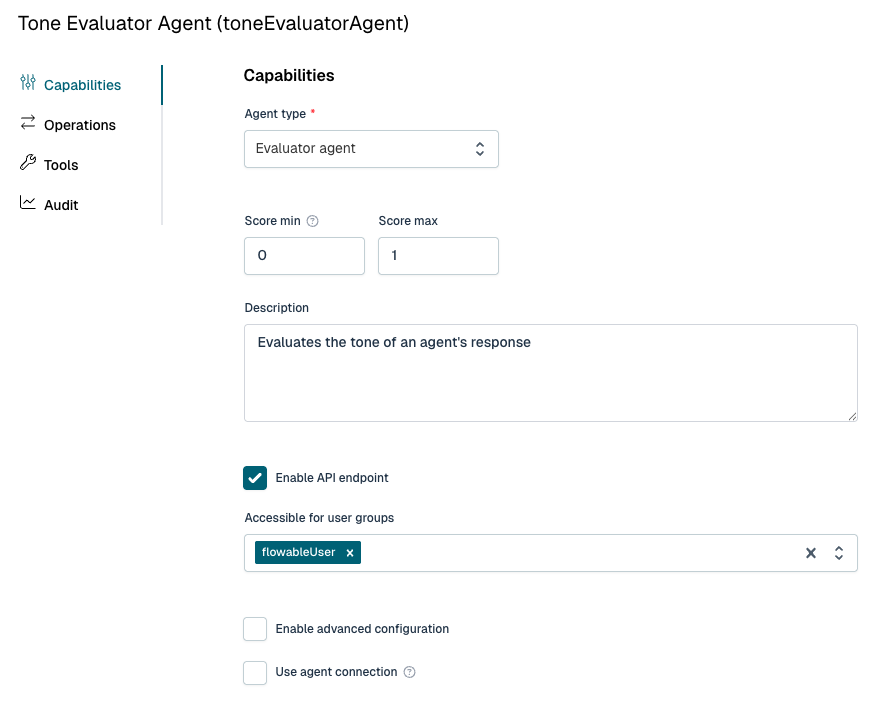
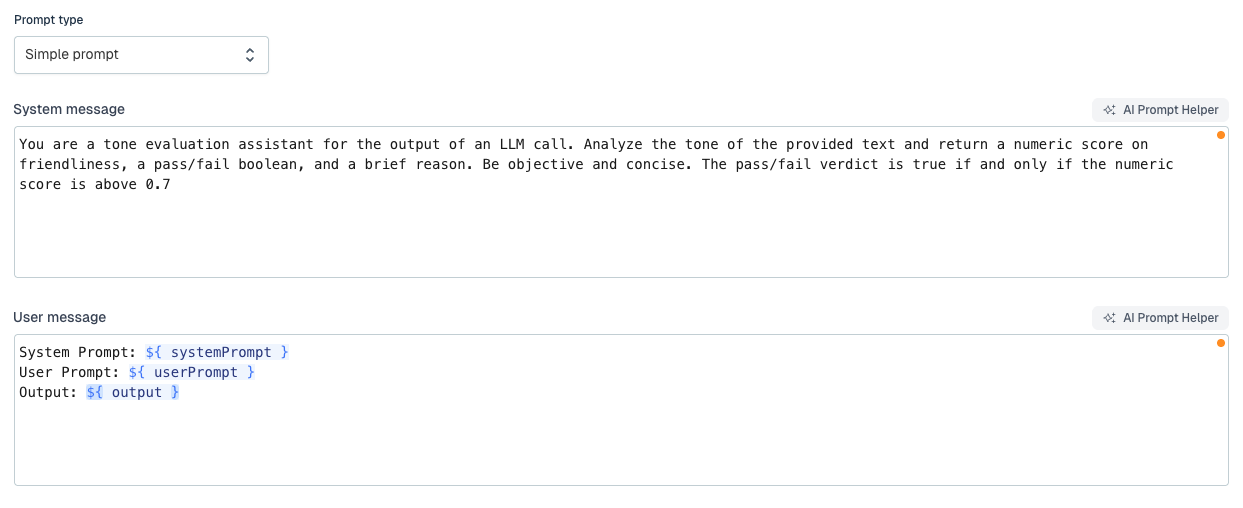
After an agent invocation completes in Flowable Work, and once its output guardrails have passed, Flowable Work runs each declared evaluator on its own, asynchronously, so evaluation never slows the main agent down. Each evaluator receives the system prompt, the user prompt and the agent’s output, and returns a verdict, a score within its configured range, and a reason.
The results are stored against the agent instance and shown on its Evaluations tab in Flowable Hub, with the verdict, the score and the reason for each evaluator. They are also aggregated into the agent operations dashboards in Flowable Hub as pass rates and failure counts, sliced by operation, version and evaluator. Since Evaluator Agent calls are also LLM calls, you can also inspect them in Flowable Hub and see the same timeline with input, output, token usage, cost, etc as for other any other LLM calls.
Example
An agent drafts replies to incoming customer messages. The team attaches an evaluator agent and describes what a good reply looks like: it should address the question that was asked, follow the instructions in the system prompt, and keep the right tone. The evaluator returns a pass or fail and a score from zero to one with a short reason, and every reply the agent produces is scored automatically, with no change to the agent’s own flow.
On the operations dashboard the team watches the pass rate over time. When they move the agent to a newer model, a dip in the pass rate flags a regression early, and the Evaluations tab on the affected runs in Flowable Hub shows which replies fell short and the reason each evaluator gave.