
Document agents
Document agents gain fallback models, structured inputs and in-Design testing.
What it is
Document agents, which classify an incoming document and extract the fields that matter, have been part of Flowable since 2025.1. This release adds the pieces that make them more robust in production and easier to build and test.
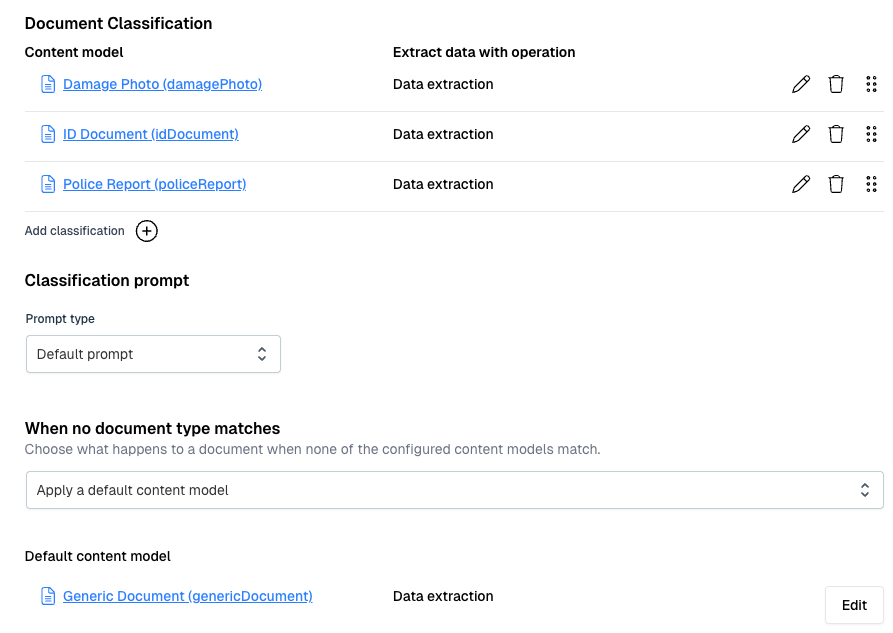
What’s new in this release:
- A configurable fallback content model, so a document that matches no content model is assigned a default model that has its own data extraction, instead of being left unhandled.
- Support for passing structured input parameters to document agent operations.
- Unit tests and evaluation for document agent operations in Flowable Design: define unit tests that run the operation and check its classification and extraction, see pass or fail with token and timing details, and use the Evaluate tab to run an operation once and inspect its response and full execution trace.
Why it matters
The fallback model means an unexpected document is still captured rather than dropped. Testing in Design lets a team build a document agent operation and check how it classifies and extracts documents with your actual models on a larger scale. That way, you can set up unit tests for your document agents and verify if they still work correctly when you switch to another LLM.
How it works
A document agent runs its classification and extraction operation against an incoming document. If the document matches no content model, the configured fallback model is used together with its own extraction. That way, documents can still have general metadata extracted, even if they don’t match any of the preconfigured content models.
In Design, each Document Agent operation has Unit Tests and an Evaluate tab. Upload your test documents to test sets and define assertions for document classification and data extraction. Run the tests until your agent classifies and extracts correctly and re-run the tests whenever you change the model or adjust the agent to make sure it still works correctly.