
Git connectivity for Design
Manage your models against a Git repository, with branching, pull requests and review, from inside Design.
What it is
Flowable Design now connects natively to a Git repository, so you manage your models the way engineering teams manage code. From inside the Design UI you can branch and raise pull requests across processes, decision tables, forms and every other artifact, and review what changed before merging. The development practices your organisation already trusts now apply directly to your process definitions.
To review open changes you use Flowable Design’s model comparison. That is a Design capability in its own right, available with or without Git, and the Git flow uses it for review: it shows model-level differences and a revision-level overview of added, modified and deleted models, so a reviewer sees exactly what changed before approving.
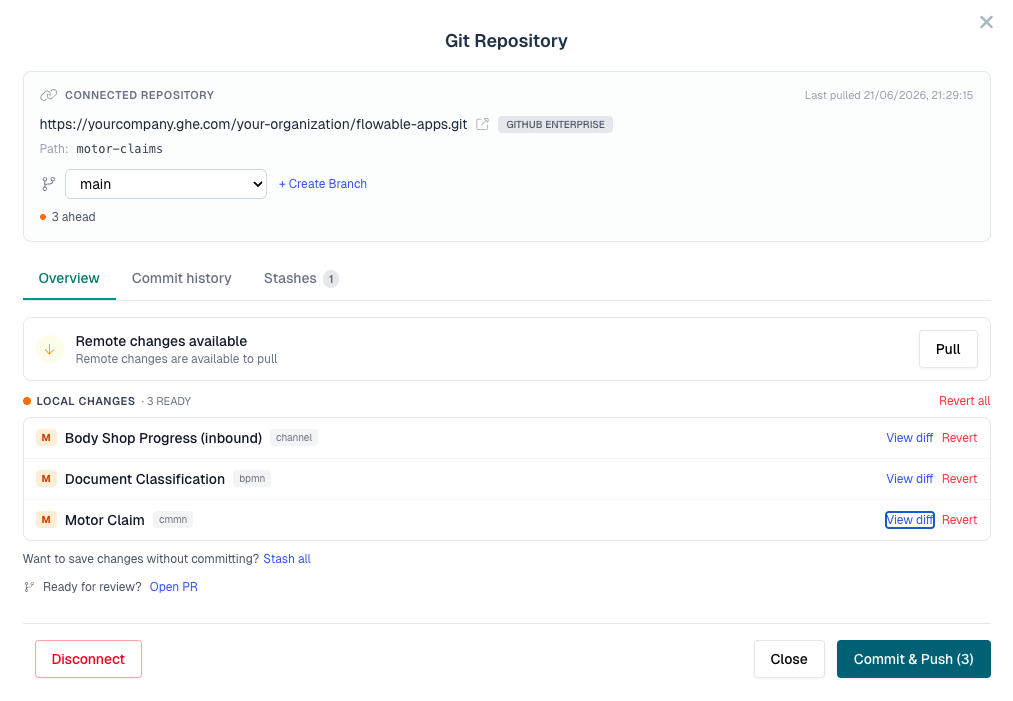
What’s included:
- Native Git connectivity from within the Design UI, no external tooling required.
- Branching and pull requests for models.
- Pullling changes from Git and pushing new commits from Design to Git
- Coverage across processes, decision tables, forms and other artifacts.
How it works
An authorized user configures a Git provider in Flowable Design, either globally or for a workspace. The apps can then be connected to a Git repository (or to a subfolder in that repo). Whenever the app overview is opened, Design verifies if there are any changes in Design itself or in Git that can be synchronized. The Git dialog shows all local and remote changes, allows to branch of into a new or existing Git branch or commit existing changes. Any changes that are not ready for a commit, can be stashed in Design for a later continuation.